
Paragon vs. Unified.to: Embedded iPaaS or Real-Time Unified API in 2026?
·
Paragon is integration infrastructure you build on: a workflow engine, a Connect Portal where your customers configure their own integrations, per-vendor actions, and a sync service that keeps a copy of their data. Unified.to is a unified API whose 1594 integrations return the same objects for each category, read and written at request time with no customer records stored. Choose Paragon if your customers need to map their own fields and choose integration settings inside your app, if non-engineers on your team maintain multi-step integration logic, or if you must forward-deploy into customers' clouds or run air-gapped; choose Unified.to if you need one data model for reads and writes across many categories, change events that carry the changed record on supported integrations, published prices, or AU hosting on Pro and Scale without self-hosting.
The "embedded iPaaS" label in this post's title describes where Paragon came from more than where it is now. On 7 July 2025 Paragon wrote, "As of today, Paragon is no longer an embedded iPaaS company", and it now calls itself "an embedded integration platform". Its Workflows product is still sold as "Embedded iPaaS for building event-driven automations", alongside two newer products, Managed Sync and ActionKit.
All figures on this page were checked against both vendors' published documentation on 8 October 2026.
How do Paragon and Unified.to compare?
Paragon and Unified.to differ most on where integration logic lives and whether a copy of your customers' data is kept, and they are closest on compliance, OAuth and passthrough.
| Dimension (8 Oct 2026) | Paragon | Unified.to |
|---|---|---|
| What it is | "An embedded integration platform" with three products: Workflows, Managed Sync and ActionKit | A unified API with normalized objects per category, maintained by Unified.to |
| Where integration logic lives | Workflows you build in low-code or TypeScript, or your own code calling ActionKit | Unified.to maintains the mapping; your code calls one model per category |
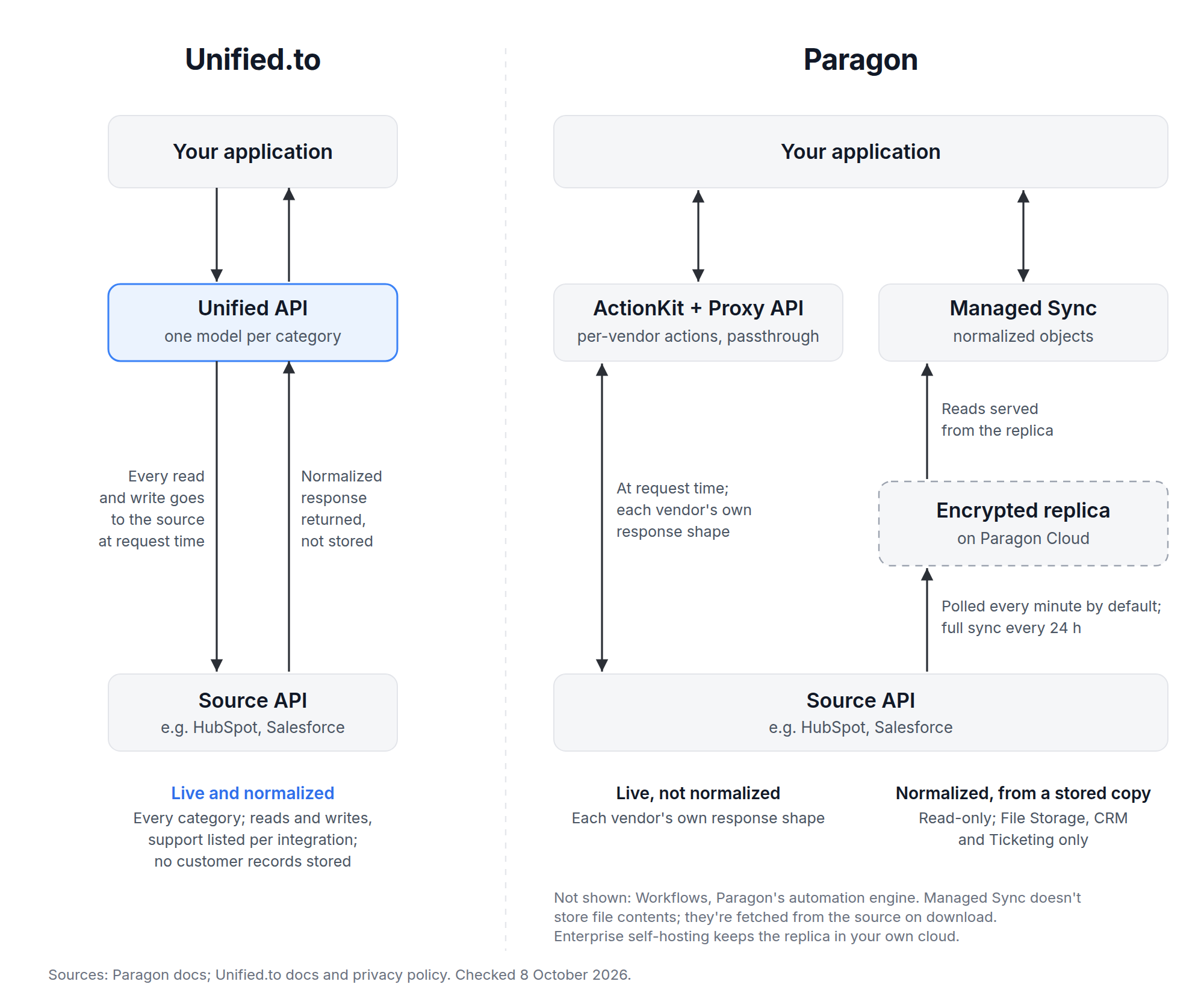
| Normalized data model | Managed Sync only: File Storage, CRM and Ticketing; read-only | Every category, for reads and writes; read and write support listed per integration |
| Request-time access | ActionKit (per-vendor tools) and the Proxy API | Every call, on the normalized model |
| Customer records stored | Managed Sync keeps "an encrypted replica" on Paragon Cloud; no retention period published | None; logs hold operational metadata only |
| Integrations | 124 integrations in 13 categories in its docs catalogue | 1594 across 36 categories |
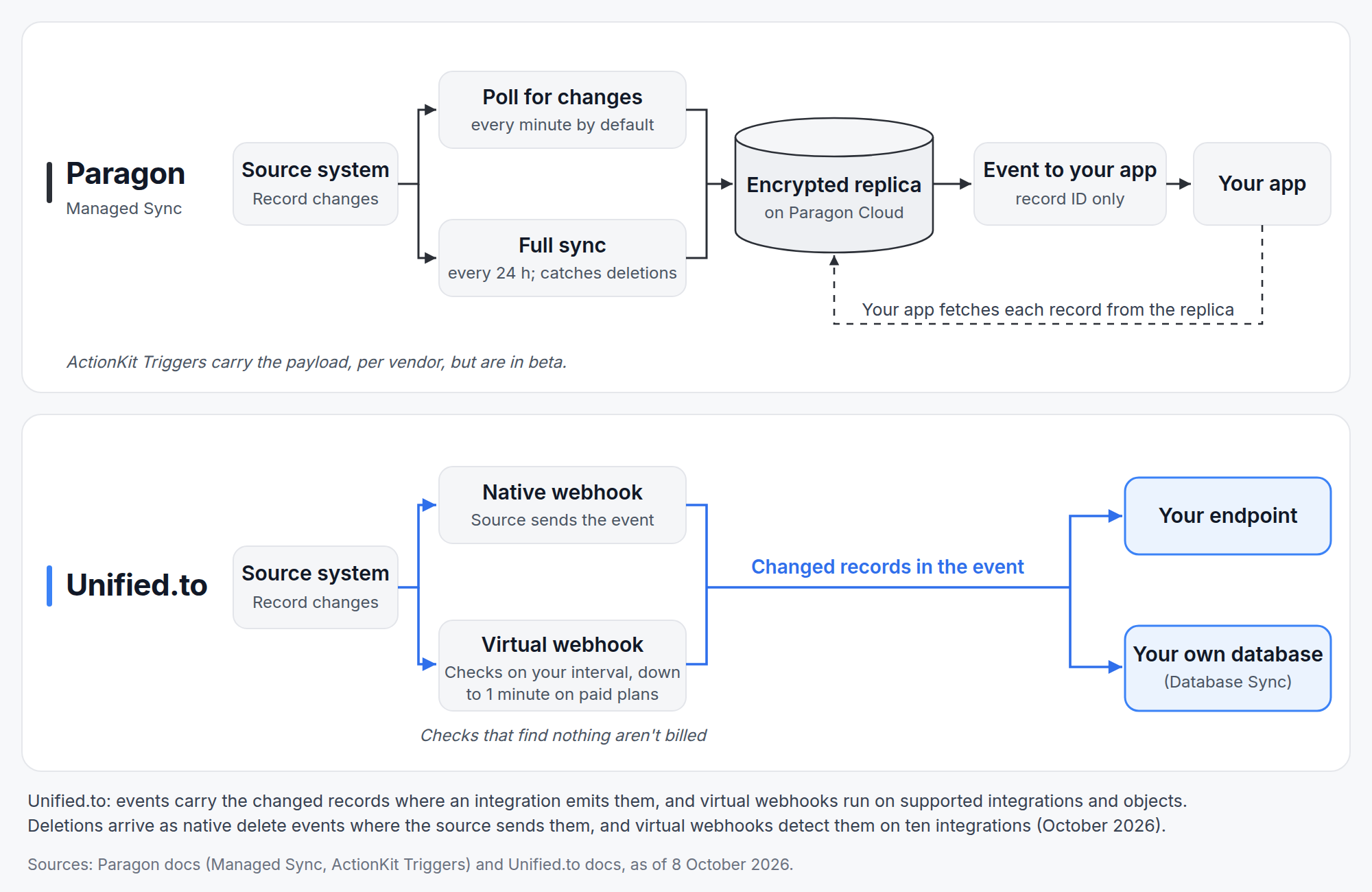
| Change detection | Managed Sync polls every minute by default; deletions found by a full sync every 24 hours | Native webhooks where available; virtual webhooks down to one minute on paid plans, on supported integrations and objects; deletions detected on ten integrations |
| What a change event carries | Managed Sync: a notification with the record ID. ActionKit Triggers (beta): the payload | The changed record, on supported integrations |
| Database delivery | Not offered; you page through synced records into your own database | Database Sync (Grow, Pro and Scale) to MongoDB, MySQL, Postgres, MSSQL, MariaDB, Supabase or Snowflake, for objects with native or virtual webhooks |
| Per-customer configuration | Connect Portal: end users set field mappings and settings; custom field mapping on Enterprise | Metadata API for custom-field lookup; no saved per-customer mapping |
| Hosting | AWS in the US and Europe, Australia "coming soon"; self-hosting on Enterprise | One region per workspace: US on every plan; EU or AU on Pro and Scale; single tenant, private cloud, dedicated cloud or on-prem on Enterprise |
| MCP | Self-hosted server per its docs and README; marketing says "managed" but publishes no endpoint | Hosted, one isolated host per region; on-prem or single tenant with the API on Enterprise |
| Backend SDKs | JavaScript, with a React component | TypeScript, Python, Go, Ruby, PHP, Java, C# |
| Pricing | Per Connected User; "Talk to sales" on both plans | From $750 a month for 750,000 API calls; customer connections unlimited |
| Compliance | SOC 2 Type II, GDPR, HIPAA (scope differs by page), CCPA named | SOC 2 Type II, GDPR, CCPA/CPRA, PIPEDA, HIPAA (BAA on Scale) |
Is Paragon an embedded iPaaS or a unified API?
Paragon is three products, and each label fits only one of them: Workflows is an embedded iPaaS, Managed Sync has a normalized model for three categories, and ActionKit is a set of per-vendor actions for code and AI agents.
- Workflows runs event-driven automations you build in low-code or TypeScript, triggered by integration events, schedules or your app.
- Managed Sync copies your customers' data into Paragon, normalized into File, Folder, Contact, Company, Deal, Custom Object and Ticket objects. It reads only; Paragon sends writeback to Workflows or ActionKit.
- ActionKit runs per-vendor actions synchronously. Its docs say "Responses will vary by integration provider", with a shared filter syntax ("contains", "equals", "greater_than") across list and search actions.
Paragon's marketing site also has a "Unified API" page, but the docs don't describe a unified API product, and Managed Sync has no HRIS, payroll or accounting objects. Unified.to's model covers every category it supports, and writes go through the same objects as reads.
What does Paragon do well?
Paragon is stronger when your customers need to configure integrations themselves, when integration logic is a multi-step automation rather than a data read, or when you must forward-deploy into customers' clouds or run air-gapped. Paragon also handles ingestion for retrieval-augmented generation (RAG), including document permissions, as a managed service.
What does Paragon's Workflows engine give you?
Paragon Workflows gives you a hosted engine for multi-step, event-driven integration logic that you can edit visually or in code. The docs say Workflows are built "in low-code or Typescript", and that you can "switch between the UI and code at any time"; Paragon notes that some advanced patterns don't round-trip through Git Sync. Workflows sync to Git through GitHub Actions and move through Development, Staging and Production environments. Failed steps are retried "up to five times with an exponential back-off", and triggers use the integration's native webhooks or poll once a minute where it has none.
Paragon's docs say Workflows lets "non-engineering teams (e.g. Product or Client Services teams) configure integrations without writing code". Unified.to has no workflow engine: the logic that decides what to do with the data stays in your code.
How does the Connect Portal handle per-customer configuration?
Paragon's Connect Portal is a pre-built modal, embedded "with a single line of code", where your customers connect accounts, choose settings and map their own fields. Each mapping is saved as a User Setting on that customer, and your Workflows read it, so a customer with a heavily customized Salesforce org maps its own fields without your team building a mapping screen. A headless option lets you use your own UI instead.
Paragon's Connect Portal features are plan-gated as of 8 October 2026. Standard field mapping is on both plans; custom field mapping is Enterprise in the pricing table (the docs say it's also a Pro add-on); removing Paragon branding is on Pro and above, on request; Workflow Permissions is Enterprise. On 7 integrations, including Salesforce, Slack and Zendesk, your customers can also connect with their own OAuth client.
Unified.to has embedded authorization components for React, Angular, Vue, Svelte and plain JavaScript, and no field-mapping UI. Its Metadata API looks up custom fields (50 platforms in the docs as of October 2026), and you build the mapping experience yourself.
Can you run Paragon in your own cloud?
Yes, on Enterprise: Paragon can be self-hosted, managed or unmanaged, in your AWS, Azure or GCP account, forward-deployed to your customers' clouds, or air-gapped. Paragon says that when self-hosted, "all synced data will be airgapped in your infrastructure and Paragon will have no access", and it publishes the reference architecture (Postgres, Redis and S3-compatible blob storage on Kubernetes). Unified.to's Enterprise plan also lists single tenant, private cloud, dedicated cloud and on-prem; Paragon documents more of its self-hosted options publicly.
What does Managed Sync do for RAG ingestion?
Managed Sync runs the ingestion pipeline for you: it backfills each connected account, then polls for changes every minute by default and runs a full sync every 24 hours to catch deletions. Paragon's Permissions API stores document permissions from 7 file-storage integrations, per its docs on 8 October 2026 (Box, Confluence, Dropbox, Google Drive, OneDrive, ServiceNow and SharePoint), in a fine-grained authorization graph, so a retrieval pipeline can check what a user may see. File contents aren't stored, per the docs; they're fetched from the source on download. If permission-aware retrieval over file storage is the core requirement, Paragon publishes a dedicated API for it.
Where are Paragon and Unified.to the same?
Paragon and Unified.to both require or support your own OAuth app in production, both have a SOC 2 Type II report, and neither holds ISO 27001 as of 8 October 2026. Both include passthrough to endpoints outside their models on every plan (Paragon's Proxy API, Unified.to's Passthrough), and both include every product or category on every plan. Both poll for changes at a one-minute minimum where a source has no webhooks: Paragon's published minimum is one minute; Unified.to's is 1 minute on paid plans, on supported integrations (as of October 2026). None of these is a reason to choose one over the other.
What does Unified.to do differently?
Unified.to gives you one maintained data model per category, read and written at request time, with no copy of your customers' records kept in between.
Where do customer records live?
Unified.to stores no customer records: reads and writes go to the source at request time, and its privacy policy says logs "contain only operational metadata such as endpoint, timing, status, and workspace". As of October 2026, Unified.to keeps logs for 60 days on Grow and Pro and 365 days on Scale.
Paragon's storage depends on the product. On Paragon Cloud, Managed Sync keeps "an encrypted replica of your customers' synced data", and as of 8 October 2026 no retention period for those records is published. Workflow executions are stored "for up to 90 days" per the docs (the pricing table says unlimited on Enterprise), and credentials sit in Paragon's encrypted vault. ActionKit and the Proxy API run at request time; ActionKit logs are kept 30 days on Pro, with response bodies shown only for errors. On Cloud, Paragon "has continuous operational access" to the service. Both vendors process your customers' data in transit, so both belong on your subprocessor list. The general case is in why unified APIs shouldn't store your customer data.
What does one data model across categories save you?
One model per category means one request shape for every CRM, HRIS, ATS or accounting integration, for reads and writes, with mapping and API changes handled by Unified.to. Paragon's normalized objects cover File Storage, CRM and Ticketing and are read-only; everything else is a per-vendor ActionKit action whose response differs by integration.
The gap is widest outside Paragon's three categories. Managed Sync has no HRIS, payroll or accounting objects; ActionKit's HR actions cover employees and time off. Unified.to models payroll as pay runs (on Check, Deel, Gusto, Paychex, Paycor and Rippling, among others), with pay groups, pay codes, typed payslip lines for earnings, deductions, taxes and employer contributions, and an Earning object on integrations including ADP Workforce Now, Paychex and Paylocity, as of October 2026. Its accounting invoices carry a ten-value status and line items coded to a project, account and tax rate, with an is_billable flag. For fields outside the model, raw returns the source's own fields and Passthrough reaches any endpoint.
Paragon and Unified.to also differ on coverage. Unified.to supports 1594 integrations across 36 categories. Paragon's docs catalogue lists 124 integrations in 13 categories, of which 23 are flagged for Managed Sync and 65 for ActionKit, as of 8 October 2026 (Paragon's ActionKit reference pages cover 68).
What do change events carry?
Unified.to's events carry the changed records where an integration emits them; Paragon's Managed Sync events carry a record ID. Paragon's docs say "Create events do not provide any record data as a part of the event payload", so your app fetches each record from Paragon's replica, and deletions arrive after the 24-hour full sync. On Unified.to, virtual webhooks detect changes on supported integrations and objects and deliver the record itself, at a one-minute minimum on paid plans, and, as of October 2026, detect deletions on ten integrations, with native delete events where the source sends them.
Paragon's ActionKit Triggers do carry the payload, signed with HMAC-SHA256, but they are in beta and per-vendor. If you want records in your own database, Unified.to's Database Sync, on Grow, Pro and Scale, writes normalized data into MongoDB, MySQL, Postgres, MSSQL, MariaDB, Supabase or Snowflake for objects with native or virtual webhooks; on Paragon you page through the synced records and load them yourself.
Where can each one host your data?
Each Unified.to workspace runs in one region: the US on every plan, or the EU or AU on Pro and Scale. Paragon Cloud runs on AWS in the US and Europe, with Australia listed as "coming soon" on 8 October 2026; any other location requires self-hosting on Enterprise. A product with an Australian residency requirement can meet it on Unified.to's Pro or Scale plan.
Whose domain does the authorization flow use?
On Unified.to, as of October 2026, an authorization CNAME (US and EU regions) puts the connection flow on your own domain on Pro and Scale. On Paragon Cloud the OAuth redirect host is Paragon's (passport.useparagon.com) by default; Paragon's marketing says auth "uses your domain", but its docs list branded domains only for Managed On-Premise. Both let you register your own OAuth app so the consent screen shows your brand.
Which one works better with AI agents?
Unified MCP is the better fit if you want a hosted MCP server in your region whose tools return normalized objects; Paragon's MCP server fits if you want to run the server yourself on top of ActionKit's per-vendor actions. The two also differ in what an agent gets back: Unified.to's tools return the same objects for every integration in a category, and ActionKit's return each vendor's own shape.
How does Paragon's MCP server work?
Paragon's MCP server is the useparagon/paragon-mcp repository, an adapter over ActionKit that its docs and README describe as self-hosted; as of 8 October 2026, Paragon publishes no hosted endpoint for it. Its transport, authentication, licence and tool counts are covered in Unified MCP vs Paragon MCP Server (ActionKit).
How does Unified MCP work?
Unified MCP is hosted, with one isolated host per region (US, EU and AU), and a credential works only on its own region's host. On Enterprise it runs with the Unified API on-prem or in a single-tenant, private or dedicated cloud. Unified MCP offers 22,566 tools. That total is the catalogue across all integrations; each connection sees only its own tools: one HubSpot connection carried 69 tools, 30 of them CRM, on 12 October 2026. It uses Streamable HTTP and supports the stateless core of the 2026-07-28 MCP revision. Controls Paragon's server doesn't document include connection-scoped signed tokens that grant exactly one connection, opt-in hide_sensitive PII redaction, per-connection permissions and tools lists, and defer_tools. As of 8 October 2026, enterprise-managed authentication, enabled per workspace on request, lets the customer's identity provider mint a token whose scopes decide which tools the agent is offered.
For the full MCP comparison, see Unified MCP vs Paragon MCP Server (ActionKit).
How do the two compare on security and compliance?
Unified.to's compliance list adds PIPEDA, CPRA and a published HIPAA BAA on Scale, while Paragon's own pages disagree on what its HIPAA attestation covers.
| Capability (8 Oct 2026) | Paragon | Unified.to |
|---|---|---|
| SOC 2 Type II | First attained 31 January 2024; the trust centre lists 2025 and 2026 reports, on request | SOC 2 Type II; 2026 report on request through the trust centre |
| GDPR | Yes; DPA with standard contractual clauses on request | Yes |
| HIPAA | Changelog (January 2026): self-hosted installations; the security page states HIPAA without that limit; a BAA is mentioned only in a blog, "for enterprise customers" | BAA on Scale |
| CCPA | Named on its security page; CPRA not published | CCPA/CPRA |
| PIPEDA | Not published | Yes |
| ISO 27001 | Not held; "Coming soon" | Not currently held |
| Single sign-on | Enterprise | SAML SSO on Pro and Scale |
| Uptime SLA | 99.9% on any paid plan, measured quarterly; beta features excluded | None on Grow, Pro or Scale; SLAs through Enterprise |
| Credential storage | Paragon's encrypted vault; in your own cloud if self-hosted (Enterprise) | Encrypted; your own secrets manager on Pro and Scale |
| Log retention | ActionKit logs 30 days on Pro, configurable on Enterprise; workflow history 90 days on Pro, unlimited on Enterprise | 60 days on Grow and Pro, 365 days on Scale; operational metadata only |
| Data residency | US and Europe; Australia "coming soon"; self-hosting on Enterprise | US on every plan; EU or AU on Pro and Scale; single tenant, private cloud, dedicated cloud or on-prem on Enterprise |
| If HIPAA is the requirement, ask Paragon which deployment its HIPAA attestation covers and for its BAA terms, since its own pages disagree. |
What does each one cost?
Paragon publishes no prices: both of its plans say "Talk to sales", and it bills per Connected User. Unified.to publishes prices for Grow, Pro and Scale and bills by API call. Prices as of 8 October 2026, from Paragon's pricing page and Unified.to's:
| Pricing (8 Oct 2026) | Paragon | Unified.to |
|---|---|---|
| Plans | Pro and Enterprise (the pricing cards call them Platform and Enterprise), both "Talk to sales" | Grow $750+/mo, Pro $1,500+/mo, Scale $3,000+/mo, Enterprise custom |
| Billing unit | Connected Users: "typically 1 Connected User = 1 of your Customer Organizations" | API calls: 750,000, 2M and 6M a month on Grow, Pro and Scale |
| Over the limit | "New Connected Users will be unable to connect integrations" | $1.00, $0.75 and $0.50 per 1,000 calls on Grow, Pro and Scale |
| Customer connections | Capped by your Connected User limit | Unlimited on every plan |
| Products or categories | All three products and unlimited integrations on both plans | All categories on every plan |
| SAML SSO | Enterprise | Pro and Scale |
| Self-hosting | Enterprise | Enterprise |
| Trial | Length not stated on the pricing page or in the docs; Paragon's comparison pages say "Free 14-day trial" | 30-day free trial on Grow and Pro |
| Paragon's terms invoice the platform fee annually in advance and Connected Users monthly. Because Paragon counts each customer organization that connects an integration, cost grows with the number of customers who connect; each Connected User includes a default usage volume, and Paragon doesn't publish how much that is or what usage above it costs. On Unified.to, cost grows with API calls, so a customer who connects and makes few calls costs little, and a virtual-webhook check that finds nothing isn't billed. Which is cheaper for your product depends on a quote only Paragon's sales team can give; the general case is worked through in usage-based versus per-connection pricing. |
How do you choose between Paragon and Unified.to?
Three factors decide most cases: whether your customers set their own field mappings and settings, whether you need one data model across categories, and where your customers' data may live.
| If you… | Choose | Why |
|---|---|---|
| Want customers to map their own fields and choose settings inside your app | Paragon | Connect Portal saves each customer's mapping; Unified.to has no mapping UI |
| Run multi-step integration logic that non-engineers maintain | Paragon | Workflows in low-code or TypeScript, with Git sync and release environments |
| Must forward-deploy into customers' clouds or run air-gapped | Paragon | All documented on Enterprise |
| Need permission-aware retrieval over file storage for RAG | Paragon | Permissions API on 7 file-storage integrations |
| Want to run the MCP server yourself | Paragon | Self-hostable server; Unified.to has no open-source MCP server |
| Need an uptime SLA without an Enterprise contract | Paragon | 99.9% on any paid plan; Unified.to offers SLAs through Enterprise |
| Need one data model across many categories, for reads and writes | Unified.to | Paragon's model covers three categories and is read-only |
| Need HRIS, payroll or accounting objects | Unified.to | Paragon's Managed Sync has none; Unified.to models pay runs and payslip lines |
| Don't want a copy of customer records in the integration layer | Unified.to | No customer records stored; Paragon Cloud keeps a replica with no published retention |
| Want change events that carry the changed record, on supported integrations | Unified.to | Managed Sync events carry an ID; deletions arrive after a 24-hour full sync |
| Want records written into your own database | Unified.to | Database Sync on Grow, Pro and Scale, on objects with change events; Paragon leaves loading to you |
| Need Australian hosting without self-hosting | Unified.to | AU on Pro and Scale; Paragon's Australia region is "coming soon" |
| Want published prices and unlimited customer connections | Unified.to | Plans from $750; Paragon is "Talk to sales" per Connected User |
| Need SAML SSO without an Enterprise contract | Unified.to | SAML SSO from Pro at $1,500; Paragon's is Enterprise |
| Need backend SDKs beyond JavaScript | Unified.to | Seven languages; Paragon's docs document JavaScript |
| Want a hosted MCP server in your region | Unified.to | One isolated host each in the US, EU and AU; Paragon publishes no hosted endpoint |
| Have every customer on the same provider | Possibly neither | A direct integration with that one provider may be simpler than either |
| The two can coexist: Paragon for customer-configured automations, Unified.to for normalized data across categories. Running both means two contracts and two credential stores, so do it only where one can't cover the requirement. |
Start your 30-day free trial of Unified.to or talk to our team to check the integrations your customers run.
Frequently asked questions
Can I move from Paragon to Unified.to without customers reconnecting?
Only if your connections use your own OAuth app. Tokens issued to your own OAuth app keep refreshing after a switch; connections on a vendor's shared OAuth app need your customers to re-authorize. Paragon requires your own OAuth app in production, yet publishes no way to export tokens, and its own blog tells buyers to ask "Are the stored OAuth credentials portable?", so plan to re-authorize customers by default. Unified.to's migration overview covers re-authorization with your customer ID passed as external_xref, and how to import your integrations covers creating connections through the API from tokens your own OAuth app issued, activated with that same OAuth app.
What happens to my connections if I leave Unified.to?
The API returns each connection's tokens, and tokens issued to your own OAuth app keep refreshing after you leave, so your customers don't reconnect.
Related reading: Architecture trade-offs: routed versus cached unified APIs · Unified MCP vs Paragon MCP Server (ActionKit) · Merge vs Unified.to · Top Merge.dev alternatives in 2026 · Usage-based versus per-connection pricing
Sources: useparagon.com, docs.useparagon.com, security.useparagon.com, Paragon's pricing page, changelog, terms of service and GitHub repositories; Unified.to documentation, privacy policy and pricing page. Checked 8 October 2026.
Written by Mallory Greene.
About the author: Mallory Greene is Head of Marketing at Unified.to. She writes about integration infrastructure, unified APIs, and MCP for technical teams. Based in Toronto.