
How to get your Greenhouse API Key and Job board token: Step-by-step guide
April 24, 2023
Developers connecting to Greenhouse will need an API Key and Job board token for authentication.
Here's how to generate, configure, and copy your Greenhouse API Key and Job board token so you can use it in your integration or share steps with your customers.
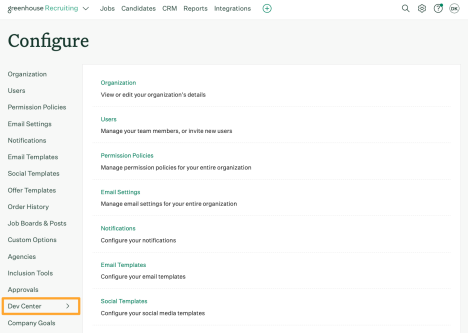
- To create a Greenhouse "Harvest" API key, click the Configure icon on your Greenhouse navigation bar and select "Dev Center" on the left.
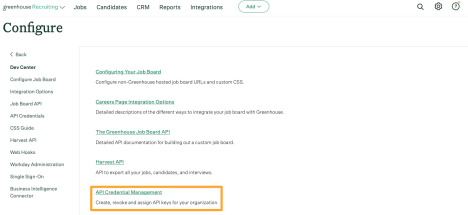
- Click "API Credential Management".
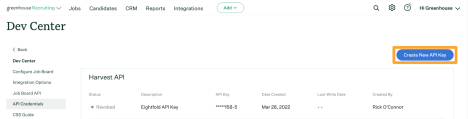
- Click "Create New API Key", and select "Harvest" for the API Type.
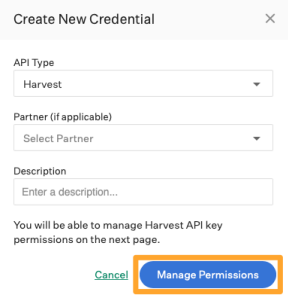
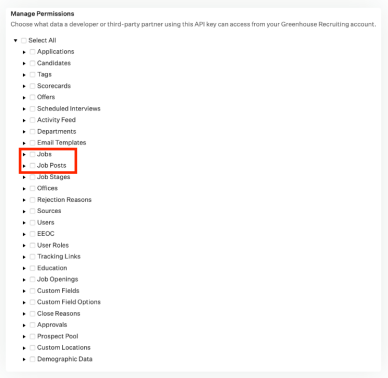
- Click "Manage Permissions".
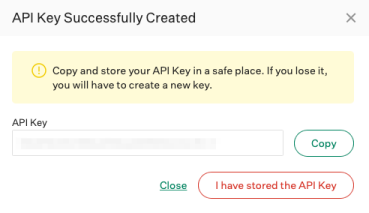
- Copy your Harvest API key to a secure location then click "I have stored the API key".
- Set Jobs, Job Posts, and Candidates, Applications, Scorecards permissions.
- Click Save
- Optionally, you can specify the job board token for your organization. Go to the "Configure Job Boards" page. (Configure gear icon > Job Boards & Posts)
- Find and edit the job board. (Ellipsis icon > Edit Board Settings)
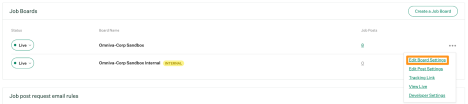
- On the Edit Your Job Board page, find the URL section. Copy this value as this is the token.

Getting your Greenhouse API Key and Job board token is the first step. The bigger challenge is supporting dozens of vendors - each with unique auth flows, schemas, and maintenance requirements.
Unified.to is a real-time integration platform built to replace that work. Instead of building and maintaining 463 custom connectors, you get one secure, normalized API layer across 27 SaaS tools.
On top of that, our usage-based pricing scales cleanly with your product. No per-connection fees, no setup charges, and no lock-in, just infrastructure economics that grow with you.
Book a demo to discover how predictable integration costs should be.