
Kombo vs. Unified.to: Sync-and-Store vs. Live Source Reads (2026)
·
Kombo syncs your customers' HR and recruiting data into its own database and serves API calls from that copy; Unified.to reads the source system on every call and stores no business data at rest. Kombo fits teams that want a vendor-hosted copy of people data, ISO 27001 or per-customer pricing. Unified.to fits teams that need current data, no third-party copy of employee records, or HR plus other categories through one API.
Key takeaways
- Architecture: Kombo mirrors source data into its database and serves reads from it; Unified.to routes each call to the source and persists only tokens and operational metadata, both encrypted at rest.
- Data currency: As of 8 October 2026, Kombo syncs on a 3-hour default and subscribes to source webhooks on 22 integrations; Unified.to returns what the source holds at request time.
- Coverage: Kombo covers four HR categories across 250+ integrations by its own count; Unified.to covers those categories plus more than two dozen others.
- Compliance: Both hold SOC 2 Type II. Kombo holds ISO 27001, which Unified.to does not; Unified.to offers HIPAA BAAs on Scale.
- AI agents: Unified.to runs a hosted MCP server over integration data; Kombo's MCP server covers its documentation only.
- Pricing: Kombo is quote-only and charges per connected customer; Unified.to publishes usage-based plans from $750/month.
For other single-vertical comparisons in this cluster, see Finch vs. Unified.to (the HRIS-focused unified API comparison) and Nylas vs. Unified.to (the communications-focused unified API comparison). For a broader survey, see Top Merge.dev Alternatives in 2026.
What's the architectural difference between Kombo and Unified.to?
Kombo is sync-and-store. When a customer connects an HRIS, payroll, ATS, assessment or learning system, Kombo syncs their records into its own database and keeps them updated. In Kombo's own words, it is "mirroring the data in the source systems into a database" at regular intervals, and your API calls read from that copy. Kombo's docs then recommend upserting what it returns into your own database. Writes can take the same route: as of October 2026, Kombo's docs say a skills write "Stores the skill in Kombo immediately and only sends it to the HRIS during subsequent syncs." That is documented for skills only, not for every write. A Passthrough API calls the source system's own API directly for cases the common model doesn't cover.
Unified.to reads the source live. Each API call, read or write, routes to the source system at request time and returns the result without caching the payload. There's no mirrored database of candidate, employee or payroll records. Only tokens and operational metadata are persisted, both encrypted at rest per the privacy policy (the metadata with AES-256), and from the Pro tier up those credentials can live in your own secrets manager, including AWS, Azure, Google Cloud, HashiCorp Vault, 1Password, Doppler and Bitwarden, instead of Unified.to's database.
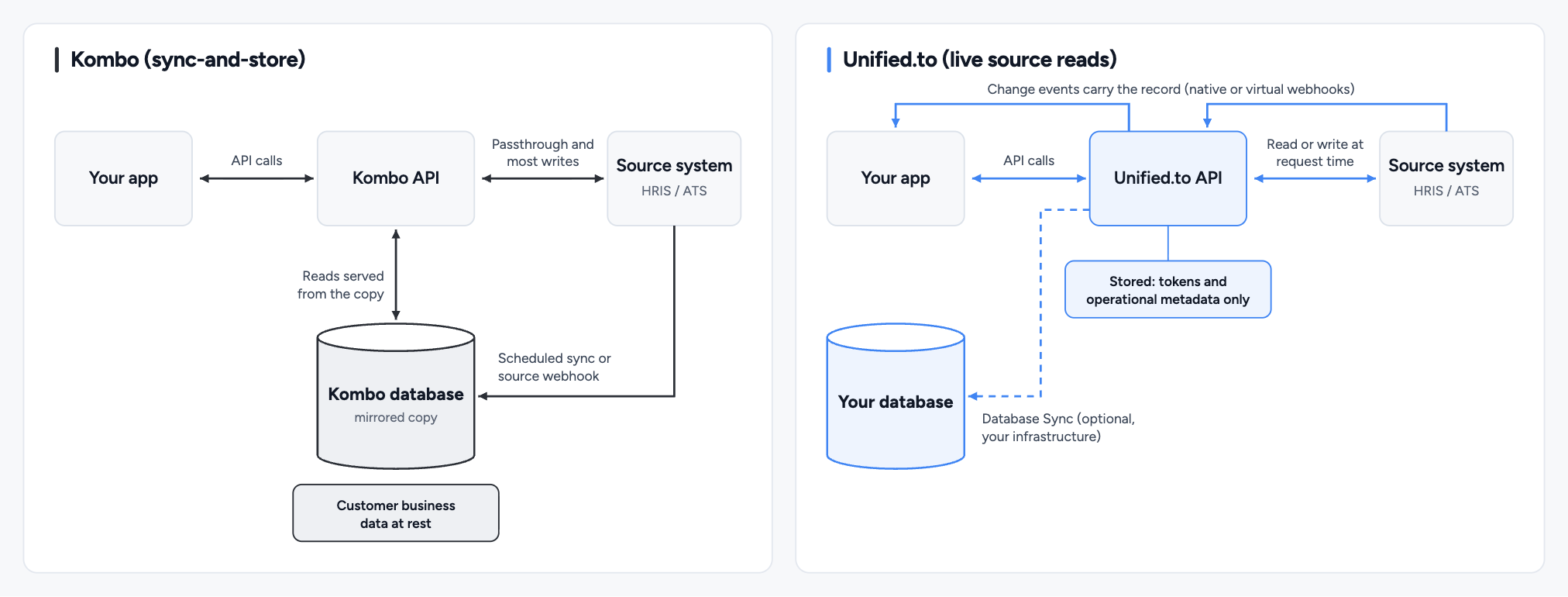
First-generation unified APIs were sync-and-store: they solved the integration problem by mirroring data into a store and serving it from there, with batch sync, a common data model on top, and the storage and staleness that come with it. Unified.to keeps the unified schema and drops the store: requests reach the source live, and no customer business data rests in vendor infrastructure. For the general trade-offs, see Pass-Through vs. Sync-Based Unified APIs.
Kombo figures in this comparison are from Kombo's docs and pricing page as of 8 October 2026.
| Kombo | Unified.to | |
|---|---|---|
| Posture | Sync-and-store, with a Passthrough API that calls the source directly | Live source reads; no business data at rest |
| Customer business data cached | Yes, mirrored into Kombo's database | No |
| Data currency | As of the last sync or processed source webhook | Fetched directly from the source on each call |
| Change detection interval | 3-hour default, with faster intervals on Scale and Enterprise (down to five minutes, per Kombo's blog) | Set per webhook with the interval field, in minutes, minimum one minute on paid plans |
| Initial sync | Required; Kombo's ATS FAQ says most complete in a few minutes, with large instances taking up to several hours | Not required; set include_all on a webhook to load existing records when you want them, on integrations that support an initial sync |
| Reconciliation metadata | changed_at, remote_deleted_at, 14-day field null-out | None; no stored copy to reconcile |
| Change notification | data-changed webhook carries the names of changed models, debounced to at most one every 30 seconds; your application then fetches the updated records | Event payload carries the changed record itself, so there's usually no follow-up fetch |
| Deletions | Explicit remote_deleted_at flag after a completed full sync | Native delete events where the source sends them; virtual webhooks also detect deletions on ten integrations, including BambooHR, Box, Google Drive and OneDrive |
Where a source system provides no webhooks of its own, Unified.to detects changes and delivers events on supported integrations and objects, mainly on created and updated records. Coverage varies by integration: pay runs carry no events, and ADP Workforce Now, Gusto, Paycor and Check emit no HR events, while Kombo's data-changed webhook covers every model it syncs. Retry logic is built in for both reading from the source and dispatching to your endpoint, and an interval that finds no new data isn't billed. Per-request latency is visible in your logs. |
How does Kombo keep its copy in step with the source?
Kombo reconciles its stored copy against the source with change timestamps, deletion flags and periodic full syncs. Records in Kombo's database carry a changed_at timestamp, and entries it can no longer find during a sync are marked with remote_deleted_at, with the fields set to null 14 days later. Those fields exist because the data lives in Kombo's store and has to be reconciled against the source over time. Kombo's documentation notes that delta syncs can't detect deletions, so deletions are found by full syncs, which run less often. Its guidance also tells you to compare nested data to work out what actually changed, and to run a periodic full fetch, ideally weekly, to correct drift including from lost webhooks.
A live-read layer has no stored copy to reconcile. The trade-off runs both ways: Kombo gives you an explicit remote_deleted_at flag once a completed full sync no longer finds a record, and deleted records can be retrieved with include_deleted, while a live read shows only that the record is no longer returned, unless the source system sends a delete event or the integration is one of the ten where Unified.to's virtual webhooks detect deletions.
Neither approach is wrong. They optimize for different things, and the rest of this comparison follows from this one choice.
What do live source reads buy you?
Live source reads give you three things a stored copy can't: data as current as the source, no third-party copy of your customers' people data, and no initial sync or drift to manage.
The data is current, not as-of-last-sync.
- When Kombo serves a read, you get the state of the data as of its last sync or processed source webhook.
- On integrations where Kombo subscribes to source webhooks, changes typically arrive within 10 to 20 seconds.
- Elsewhere, Kombo syncs run on a 3-hour default, with faster intervals on Scale and Enterprise (down to five minutes, per Kombo's blog), and a sync can be triggered manually.
- Kombo's own read path is unchanged either way: a source webhook updates Kombo's database, and your call still reads from that copy.
- When Unified.to serves a read, the call reaches the source system and returns what's there now.
- For an in-product recruiter view or an employee record a user is actively editing, the difference between "now" and "as of the last sync" is the difference between showing correct data and showing stale data.
If the vendor is breached, it's your customer's data.
- Sync-and-store means your customers' people data, which is personal information and often falls in regulated categories, is persisted in the vendor's infrastructure.
- Any integration vendor that processes that data is a subprocessor, Unified.to included, but a vendor that stores it also holds a standing copy your customer has to account for in every security review: how it's secured, where it lives, how long it's kept and how it's deleted.
- For some enterprise buyers this decides the evaluation: a CISO who won't approve a third party holding employee records won't approve the integration that depends on one.
- With live source reads, that data passes through in transit and never comes to rest outside the source system and your own product, so the security-questionnaire answer "no third party stores your people's data" is true by design.
There's no sync to wait on or to break.
- A stored model needs an initial sync before it's usable and an ongoing reconciliation loop that can lag or drift.
- Live source reads have no warm-up and no drift: the first call works and every call reflects the source.
- The trade-off is that each live read takes as long as the source system takes to answer.
Does the common model limit which fields you can reach?
No. On Unified.to, raw returns the source payload next to the unified object and the Passthrough API reaches unmodelled endpoints, both live. Kombo offers custom fields, remote fields and a Passthrough API, but as of October 2026 its raw remote data is deprecated.
- Raw fields alongside the unified object. Request
rawin thefieldsparameter and the response includes the original source payload next to the unified object, including platform-specific fields that aren't in the common model. Some platforms, HubSpot and Salesforce among them, return custom fields only when you name them, so you add them with araw.prefix (fields=id,name,raw,raw.leadFunnelStage). Writing platform-specific attributes works the same way in reverse, inside arawobject in the request body, and the source system's own record ID stays available atraw.__idif you need it for a Passthrough call. The common model is the default, not the ceiling. - The Passthrough API for anything unmodelled. When you need an endpoint or object that isn't in the common model at all, call the Passthrough API with the connection, path, method and body. Unified.to handles authentication and routing and returns the native response, through your existing connection.
Both mechanisms read the source live, so reaching beyond the common model doesn't move you onto a different, staler code path. Kombo's escape hatches are custom fields and field remapping on reads, remote fields on writes, and a Passthrough API that calls the source system's own API directly. Kombo's docs say "Remote data is deprecated and can no longer be enabled," and its integration field values are collected during a sync and saved. On Unified.to, the unified call and the raw field both read the source live; on Kombo, the Passthrough API is the only live path.
How does authorization work, and whose name do your customers see?
On Unified.to, customers authorize through one flow that carries your own OAuth app, name and domain. Kombo's flow shows Kombo's branding by default, replaceable with a customer's logo and name through partner credentials where an integration supports them.
Authorization is where integrations stall: someone who doesn't know your product yet, probably isn't technical, and may not fully trust you has to hand over access to their core business data. Unified.to's single authorization flow covers every integration, whether OAuth2, API keys, tokens or custom auth models, without your customer needing to understand what's happening underneath.
- Your consent screen. On OAuth2 integrations you register your own developer app with each vendor, so the consent screen carries your name, logo and privacy policy, and you control which permissions are requested.
- Your name and domain. On integrations that authenticate with an API token, the authorization page shows your workspace name, and on Pro and above you can replace
auth.unified.towith your own domain through a CNAME (US and EU regions) record, with your own favicon. - Your component. The embedded authorization component ships as React, Angular, Vue, Svelte and plain JavaScript packages, can be forked and restyled completely, and picks up newly activated integrations without a code change.
Registering a developer app with each vendor is the slow step, so Unified.to publishes OAuth app-registration skills that walk a coding agent through each vendor's developer portal. Because the apps are yours, so are the connections: the API returns each connection's tokens, and tokens issued to your own OAuth app keep refreshing if you leave. Kombo doesn't yet support partner credentials on every tool ("We are always improving the support for custom partner credentials").
When is Kombo the better choice?
Kombo is the better choice when you want a vendor-hosted, queryable copy of people data, need ISO 27001 or a plan-level uptime SLA, or prefer per-customer pricing over metered calls.
- A queryable copy you don't have to host. For workloads that query the same records many times and don't need them current to the second, such as historical reporting, batch analytics and internal dashboards over employee data, serving from a store avoids repeated round-trips to the source. Kombo runs that store for you. Unified.to's answer to the same workload is Database Sync (Grow, Pro and Scale, for objects with native or virtual webhooks), which streams the records into your own database, so you own the copy but you need a database to sync into and you query it yourself. If you'd rather not run one, Kombo's architecture removes that step.
- HR-category focus. Kombo, which has offices in New York and Berlin (per its docs, as of 8 October 2026), builds only for HR, payroll, recruiting, assessment and learning systems, documents recruiting-specific features per integration such as candidate source writing and screening-question answers, and offers AI Apply, which turns job posting URLs into an API surface for creating applications.
- ISO 27001 certification. Kombo holds ISO 27001, which Unified.to does not currently hold. For enterprise procurement that requires ISO 27001 specifically, that's a real differentiator.
- An uptime SLA listed on its plans. Kombo lists an uptime SLA as a plan feature on Scale and Enterprise, and a support SLA on Enterprise. Unified.to doesn't offer a standard SLA on the API or webhooks, though SLAs are available through Enterprise agreements. If a contractual uptime commitment has to be a line item rather than a negotiation, that's a real difference.
- Per-customer pricing. Kombo charges a platform fee plus a per-customer connection fee rather than per API call, with unlimited calls inside each connection, and its per-customer fee decreases at scale. That decouples cost from call volume, which helps if you have a small number of customers each generating heavy usage. The trade-off is that cost scales with customer count rather than usage. Those unlimited calls also read Kombo's synced copy, refreshed every 3 hours by default or by source webhooks on the integrations that send them; each Unified.to call reads the source system at request time.
- Saved per-customer field mapping and default credentials. Kombo saves field mappings per integration, and your end customers can map their own fields during onboarding; Unified.to has no saved per-customer mapping. For most integrations Kombo also provides default credentials, so you can go live before registering your own OAuth app.
- Hands-on support. Kombo offers white-glove onboarding calls with your customers on its Enterprise plan.
If your product is HR-tech first and your access pattern is frequent reads over cached records, Kombo's architecture is built for that. The trade-off you're accepting in return is that your customers' people data lives in Kombo's infrastructure, and reads are as current as its last sync or processed source webhook rather than as current as the source.
How does Kombo's coverage compare to Unified.to's?
Unified.to covers every category Kombo does (HRIS and payroll, ATS, assessment and background check, and LMS) plus more than two dozen others. Kombo covers four HR categories across 250+ integrations by its own figure.
Figures here are current as of 8 October 2026, and Unified.to's live matrix is the canonical source. Beyond the HR categories and identity and directory, Unified.to adds CRM, Accounting, Marketing Automation, Messaging, Calendar & Meetings, Ticketing, File Storage, Enrichment and AI Tooling, among others: 36 categories across 1722 integrations in total. Each catalogue lists systems the other doesn't, so check both against the specific systems your customers run.
Breadth matters here because every category Unified.to covers reads the source the same way: HR, CRM, accounting and messaging all use live reads, no stored copy, and raw and Passthrough access to each source. A product that needs HR plus other categories integrates one vendor with one set of architectural guarantees, instead of pairing an HR specialist with separate vendors, each with its own data-handling posture to evaluate. Kombo's own buyer's guide makes the same point: companies that need integrations beyond HR, such as accounting and CRM, will need to combine Kombo with other specialized solutions.
Payroll objects differ too. As of 8 October 2026, Kombo publishes payslips and pay runs on UKG Pro and UKG Ready only, its pay groups are in closed beta, it has no pay-code model, and its payslip lines carry no earning, deduction or tax type; Kombo's own HRIS buyer's guide says it "does not return line-item pay statements with earnings, taxes and deductions." Unified.to reads pay runs on Check, Deel, Employment Hero Payroll, Gusto, Paychex, Paycor, Remote.com and Rippling, and types each payslip line as an earning, deduction, tax or employer contribution, with a pay code where the integration supplies one. It also has an Earning object (hris_earning) for amounts added to a pay cheque, the counterpart to deductions, on ADP Workforce Now, Check, Employment Hero Payroll, Gusto, Paychex, Paycor, Paylocity, Remote.com and UKG Pro HCM; methods vary by integration.
Unified.to publishes a per-integration capability matrix: which objects, fields and webhooks are supported for each system, visible before you commit. Kombo documents supported fields and operations publicly too, per integration and per operation, and its API returns per-field coverage status for each integration.
| Kombo | Unified.to | |
|---|---|---|
| Categories | 4 unified APIs: HRIS and payroll, ATS, assessment and background check, LMS | 36, including HRIS, ATS, LMS, Assessment, Verification, CRM, Messaging, Calendar |
| Integrations | 250+, Kombo's published figure (October 2026) | 1722 across all categories |
| Capability transparency | Supported fields and operations documented publicly per integration and per operation; per-field coverage status available through its API | Published per-integration capability matrix |
How do Kombo and Unified.to compare for AI agents?
As of 8 October 2026, Unified.to runs a hosted MCP server over integration data, and Kombo publishes an MCP server for its documentation only.
An agent reasoning over a stored copy is reasoning over data as current as the vendor's last sync or processed source webhook. An agent over a live-read layer reads the source at the moment it acts. In a report, one stale data point among millions is noise; in an agent, it can be a wrong action that costs money.
Kombo's documentation MCP server has three tools for searching its docs and sending feedback; it does not use your API key or reach customer data. Kombo's docs, changelog and GitHub show no MCP server for integration data, though a September 2026 Kombo blog post says Kombo "lets you use all integrations via MCP." Its other AI-related products are AI Apply, which turns job posting URLs into an API surface for creating applications, and browser-agent integrations, which read and write structured data in systems that don't provide an API, with ATS as the primary scope.
Unified MCP runs as part of the Unified API, so there's nothing separate to deploy, and on Enterprise it runs single-tenant, in a private cloud or on-prem with the API. It supports the stateless core of the 2026-07-28 MCP revision in production, so MCP requests pass through corporate gateways and load balancers on the same terms as any other HTTP request (MCP v2 is here). 22,566 callable tools, normalized and passthrough, span 1722 integrations, reading and writing; include_external_tools makes each vendor's own endpoints available as tools alongside the normalized ones. These controls decide what an agent sees:
- Connection-scoped URLs. Each connection gets its own URL, which can carry a signed token scoped to that one connection, so your workspace API key stays on your side. A connection-scoped session only shows the agent tools for that connection's integration.
- PII redaction.
hide_sensitivestrips personal information, including names, emails and telephone numbers, before results reach the model. - Tool restrictions.
permissionsandtoolsrestrict which tools are offered at all, anddefer_toolsdefers loading to reduce context use. - Regional hosts. Each region (US, EU and Australia) has its own host, and a credential works only on its own region's host, so requests don't cross regions.
- Enterprise identity. Your own identity provider can issue scoped MCP tokens, enabled per workspace on request, and an agent is then offered only the tools the user's scopes allow.
Each tool call counts as one API request on your plan and against your workspace rate limit, so a burst of calls can return HTTP 429. For a comparison of hosted MCP servers, see Unified MCP vs. Merge Agent Handler.
How do Kombo and Unified.to compare on security and compliance?
Both hold SOC 2 Type II and state HIPAA and GDPR compliance. Kombo adds ISO 27001; Unified.to stores no customer business data at rest, offers customer-managed secrets from Pro and offers HIPAA BAAs on Scale.
| Kombo | Unified.to | |
|---|---|---|
| SOC 2 Type II | Yes | Yes |
| ISO 27001 | Yes | Not currently held |
| HIPAA | Claimed; no BAA published | Compliant; BAAs on Scale |
| GDPR | Compliant | Compliant |
| CCPA/CPRA and PIPEDA | Addressed in Kombo's Global DPA (17 September 2026) | Supported |
| Data residency | US, Canadian and EU data centres (Kombo's security page) | US on every plan; EU or AU on Pro and Scale |
| Customer business data at rest | Yes, mirrored | No |
| Customer-managed secrets (BYOK) | Not documented | AWS / Azure / Google Cloud / HashiCorp Vault / 1Password / Doppler / Bitwarden and others (Pro and above) |
| SAML SSO | Scale and Enterprise, per Kombo's pricing table | Pro and above |
| Restricting which IPs can call the API | Yes, per API key (IP or CIDR allowlist) | Yes, API access can be restricted by IP address (Pro and above) |
| Single-tenant / on-prem | Not documented | Single tenant / private cloud / dedicated / on-prem (Enterprise) |
| The structural difference is what each is securing. Kombo protects a store it holds, with encryption at rest, in-region isolation and the ISO 27001 controls around it, and that store is its strength for buyers who require those certifications. Unified.to's posture is that the most sensitive data never rests in vendor infrastructure at all, with customer-managed secrets, HIPAA BAAs as a documented SKU, and single-tenant and on-prem deployment options. For the reasoning behind that posture, see why unified APIs shouldn't store your customer data. |
Logging follows the same split. Kombo's logs keep request data, "including the request and the response," for 30 days on all plans except Enterprise, where retention is 90 days or more. Unified.to's logs carry operational metadata rather than payloads, retain for 60 days on Grow and Pro and 365 days on Scale, can be filtered by connection to track consumption per customer, and on Pro and Scale can be shipped to your own Datadog, Grafana or ClickHouse.
How does Kombo's pricing compare to Unified.to's?
Kombo is quote-only and charges a platform fee plus a fee per customer; Unified.to publishes prices from $750/month and charges by API call, with unlimited customers and connections.
Kombo's three tiers, Start, Scale and Enterprise, each lead to a demo request, with no public dollar amounts. The platform fee is annual, the per-customer fee decreases as you scale, and calls within each connection are unlimited.
Unified.to's published plans (Grow and Pro start with a 30-day free trial; Scale and Enterprise start with a demo):
| Plan | Price (from) | API calls included | Overage per 1,000 calls | Adds |
|---|---|---|---|---|
| Grow | $750/month | 750,000 | $1.00 | Unlimited customer connections, integrations, webhooks, Database Sync (on objects with change events) and custom fields; all 36 unified APIs |
| Pro | $1,500/month | 2M | $0.75 | SAML SSO, customer-managed secret storage, IP restriction, authorization CNAME, log shipping |
| Scale | $3,000/month | 6M | $0.50 | HIPAA BAAs, 365-day log retention |
| Enterprise | Priced by usage or by connection | Not published | Not published | Single-tenant, private-cloud and on-prem options |
| API call overages are the only additional usage cost on the published tiers. The two models pull in opposite directions as you grow. With a per-customer model, your cost rises with every customer you onboard; with a per-connection model, it also rises with every integration each customer connects. On Unified.to's usage-based plans, customers and connections are unlimited, cost tracks API activity, including one request per MCP tool call, and unit price drops as volume grows. Adding integrations to existing customers doesn't multiply spend. |
Usage-based pricing needs discipline on heavy read volume, meaning high-frequency or analytical workloads that would run up calls. Database Sync, included on every published plan for objects with native or virtual webhooks, streams records to your own database, whether MongoDB, MySQL, Postgres, MSSQL, MariaDB, Supabase or Snowflake, for analytics and high-volume cached reads, so you can reserve live API calls for the data that has to be current. Each page of records it writes counts as one API call, and the queries you then run against your own database don't count at all. That copy lives in your infrastructure, not Unified.to's, which is the difference from sync-and-store: a cached copy is sometimes the right tool, and the question is who holds it.
Per-customer pricing is easy to model and grows with adoption; usage-based pricing rewards adoption, provided you use webhooks and Database Sync (Grow, Pro and Scale, on objects with change events) for the workloads that don't need a live call. Run your own numbers against your projected customer count, integrations per customer and call volume, and see how usage-based and per-connection pricing compare.
How did Humi ship 25 HRIS integrations in one month?
Humi, a cloud HR platform for Canadian companies, launched 25 HRIS integrations in one month on Unified.to, with one engineer working alongside a technical lead and a product manager. Before choosing Unified.to, its engineering team expected each new HRIS integration to take three to six months to build; built natively, the work would have equated to more than seven years of engineering time. "Unified is impressively fast at responding to our integration requests and adding them within days," says Kevin Kliman, CEO of Humi. (Humi case study)
Humi is the relevant data point for this comparison because it's an HR-first product that chose a multi-category vendor reading each source live. If its integrations extend past employee data into the systems around it, such as CRM, accounting or calendar, they run through the same API and the same architecture, without adding a second vendor.
How do you choose between Kombo and Unified.to?
Choose Kombo if you want the vendor to host a queryable copy of people data, need ISO 27001, or have a few customers with heavy call volume; choose Unified.to if your product shows records users are working on, your customers' security reviews reject third-party storage of employee data, or you need payroll line items, categories beyond HR, or agents acting on customer data. If every customer runs the same HR system, a direct integration with that system may be simpler than either.
| If you… | Choose | Why |
|---|---|---|
| Want a vendor-hosted copy of people data to query repeatedly, without running a database | Kombo | Its store serves reads; Unified.to's equivalent, Database Sync (Grow, Pro and Scale, on objects with change events), needs your own database |
| Need ISO 27001 for procurement | Kombo | Unified.to doesn't hold it |
| Need an uptime SLA on a standard plan | Kombo | On Kombo's Scale and Enterprise plans; Unified.to only through Enterprise |
| Have a few customers, each with heavy call volume | Kombo | Calls are unlimited within each connection; they read Kombo's synced copy, where each Unified.to call reads the source |
| Want end customers to map their own fields during onboarding, or to go live before registering your own OAuth apps | Kombo | Saved per-customer mapping and default credentials; Unified.to has neither |
| Want white-glove onboarding calls with your customers | Kombo | Included on Kombo's Enterprise plan |
| Show records users are actively viewing or editing | Unified.to | Every read reaches the source |
| Sell to enterprises whose security reviews reject third-party storage of employee data | Unified.to | No customer business data at rest |
| Need payroll line items typed as earnings, deductions, taxes and employer contributions | Unified.to | Kombo's own HRIS buyer's guide says it doesn't return them |
| Need HR plus CRM, accounting or messaging | Unified.to | One vendor, one architecture |
| Are building agents that act on customer data | Unified.to | Hosted MCP over integration data; Kombo's MCP server covers its docs only |
| Need customer-managed secrets, single-tenant or on-prem deployment | Unified.to | Customer-managed secrets on Pro and above; single-tenant and on-prem on Enterprise |
| Have many customers with moderate activity each, or want public self-serve pricing | Unified.to | Customers and connections are unlimited; cost tracks API calls |
| Have every customer on the same HR system | Possibly neither | A direct integration with that one system may be simpler than either unified API |
Frequently asked questions
Does Unified.to cover the same HR and ATS systems as Kombo?
Largely, yes. Unified.to's HR category covers Workday, BambooHR, Gusto, ADP, HiBob, SAP SuccessFactors, Personio and others; its ATS category covers Greenhouse, Lever, Ashby, Workable, JobAdder, SmartRecruiters and more, all reading the source live. Both catalogues also list systems the other doesn't, including on both sides in Europe, so check variants and stage labels for the systems your customers run.
How does Kombo compare to Finch?
Both are HR-vertical unified APIs on sync-and-store architectures: Finch covers HR, payroll and benefits and prices per connection, while Kombo prices per customer and also covers ATS, assessment and LMS; for Finch's coverage, hosting and prices, see Finch vs. Unified.to.
How do I move from Kombo to Unified.to?
Unified.to's Kombo migration guide maps Kombo's authorization, API calls, pagination, webhooks and passthrough to Unified.to, and covers re-authorizing customers. Kombo publishes no token export (as of 8 October 2026), and only tokens issued to an OAuth app you own keep refreshing after the switch, so plan for customers connected through Kombo's default credentials to reconnect.
Start your 30-day free trial of Unified.to or talk to our team to see how the architecture fits your product.
Written by Mallory Greene.
About the author: Mallory Greene is Head of Marketing at Unified.to. She writes about integration infrastructure, unified APIs, and MCP for technical teams. Based in Toronto.