
Chift vs. Unified: Which Unified API Should Your Product Use in 2026?
·
Chift is a Brussels-based unified API for European financial software that also reaches desktop ledgers on customers' own servers through a Windows local agent: as of 12 October 2026 its docs list seven unified APIs (accounting, invoicing, POS, e-commerce, payment, property management and banking) across 151 connector entries, 51 of them accounting. Unified.to is a unified API with a hosted MCP server: products and agents read and write one normalized model per category across 2154 integrations in 38 categories, at request time, with no customer records at rest. Choose Chift for European financial software such as Sage 100 FR, DATEV or Pennylane; choose Unified.to when your product needs accounting alongside HRIS, ATS, ticketing or other categories Chift doesn't cover, change events that carry the record, or published pricing.
How do Chift and Unified.to compare?
Chift and Unified.to differ most on category range, on-premise reach, what each stores and what a change event carries: Chift is built around European financial software, while Unified.to covers 38 categories with one normalized model per category.
Chift and Unified.to at a glance (checked 12 October 2026)
| Chift | Unified.to | |
|---|---|---|
| Categories and integrations | Seven unified APIs in its docs, six on its website; 151 connector entries in its coverage data (145 in its integrations directory) | 2154 integrations in 38 categories |
| Desktop and on-premise software | Windows local agent, required on 10 connector entries and optional on DATEV; QuickBooks Online, not QuickBooks Desktop | QuickBooks Desktop through QuickBooks Web Connector credentials; Sage 100 through its Web Services |
| Reads | Live by default, with every GET cached for up to 5 minutes; an opt-in data layer serves reads from a copy Chift keeps | Each request goes to the source API at request time, with no caching |
| Change events | Platform events (connections, flows, data layer, issues) plus two POS order events; data-change events carry table names, not record IDs | Native webhooks forwarded as the source sends them; virtual webhooks at a 1-minute minimum on paid plans; support varies by integration |
| Stored data | Cached reads; data layer copies (opt-in); data moved by Syncs; API transactions kept 6 months | No customer records at rest; logs hold operational metadata only |
| Delivery to your own database | None published; Chift's docs describe reading from its data layer if you mirror data yourself | Database Sync on Grow, Pro and Scale to MongoDB, MySQL, Postgres, MSSQL, MariaDB, Supabase or Snowflake, for objects with native or virtual webhooks |
| Writes | Published per connector; at least one write on 48 of 51 accounting connectors, including bank transactions on 11 | Normalized model; no batch or bulk write method |
| OAuth apps | Chift's own app on 16 accounting connectors per its coverage data, though its Pennylane and Pennylane Firm pages say you need your own; your own app required on others, such as Xero | Your own OAuth app, so the consent screen carries your brand |
| End-user authorization | Activation link per connection; a Chift-hosted connector picker or one you build; your logo and colours on Chift's public pages | Embedded components for React, Angular, Vue, Svelte and plain JavaScript; authorization CNAME on Pro and Scale |
| SDKs | Python and Node.js | TypeScript, Python, PHP, Java, Go, C#, Ruby |
| MCP | Hosted server with OAuth, one consumer per authorization; open-source local server; "50+ tools" | Generally available; Streamable HTTP; connection-scoped tokens; 202,568 tools in the catalogue |
| Support | In-platform messenger with an AI assistant that opens tickets; under its 2023 terms, time spent on incidents that aren't Chift's fault is billed hourly unless a support subscription applies | Private Slack or Discord on Grow and Pro; email added on Scale; prioritized 24/7 support on Enterprise |
| Pricing | Per connection, set by contract | Per API call on Grow, Pro and Scale (Enterprise by quote); from $750 a month; unlimited connections |
| Sources: Chift docs glossary; Chift integrations; Chift security; Chift trust centre; Chift legal; Chift's coverage data, embedded in its accounting coverage page; Unified.to pricing; Unified.to security. |
Which accounting systems does each cover, including European and on-premise software?
Chift is built around European accounting software, including desktop ledgers on customers' own servers; Unified.to covers 355 accounting integrations in one normalized accounting model, including QuickBooks Desktop and Sage 100.
Chift (as of 12 October 2026)
- Accounting connectors. Chift's coverage data lists 51 accounting connectors: 34 live and 17 in beta, which Chift's legend describes as "usable in production but may still evolve". Eight carry a
premiumplan tag that no Chift page defines. - Local European ledgers. The list includes Exact Online in four country versions (BE, DE, FR, NL), DATEV, Pennylane, MyUnisoft, Tiime, Fortnox, Tripletex, Procountor, Twinfield and Yuki. Chift's Series A announcement names France, Belgium and the Netherlands as its first markets, and its integrations directory filters by European country, plus "International software". No Chift page names a US, Canadian or APAC market of its own; North America and Oceania appear only as account regions on its Klarna and Lightspeed connector pages. Its named customers include Pennylane, Qonto, Pleo, Agicap and Sellsy (Chift case studies).
- The local agent. The agent "acts as a proxy between your server and Chift's infrastructure" (local agent). The end customer installs it as a Windows service with a settings file for that connection; it needs .NET Framework 4.8 (prerequisites), connects outbound and opens no inbound port, and sends a heartbeat every 15 to 20 minutes.
- Where it's required. On 10 connector entries: a3ERP, Sage 100 FR, Sage 200 ES, Sage 50 FR, Sage 50 UK, Sage BOB 50 and Winbooks Classic in accounting, EBP and Sage 100 Gestion Commerciale in invoicing, and Clyo Systems in POS, per Chift's coverage data and connector pages. It's optional on DATEV, where Chift uses the agent when the DATEVconnect API can't be reached from outside the customer's network (DATEV).
- Stated limit. "Chift connects to QuickBooks Online only, not QuickBooks Desktop." (QuickBooks)
Unified.to
- One API across categories. A product that reads ledgers and HR data uses one Unified.to API and one authorization component, though each customer still authorizes each system.
- Desktop accounting. As of 12 October 2026, Unified.to's QuickBooks Desktop integration authorizes with QuickBooks Web Connector (QBWC) credentials, writes 10 accounting objects and sends native webhooks (QuickBooks Desktop). Its Sage 100 integration authorizes with the customer's Sage 100 Web Services URL, company code and credentials; it creates and updates sales orders and updates contacts (Sage 100). Chift's Sage 100 FR is a different product.
Coverage by category: Chift connector entries (counted 12 October 2026) and Unified.to integrations
| Category | Chift entries | Chift examples | Chift entries with at least one write | Unified.to integrations |
|---|---|---|---|---|
| Accounting | 51 (34 live, 17 beta) | Exact Online, DATEV, Pennylane, Sage 100 FR, Xero, NetSuite | 48 | 355 |
| Invoicing and CRM (Chift's label "Invoicing & CRM"; contacts, opportunities and invoices) | 26 (21 live, 5 beta) | Sellsy, Axonaut, Teamleader, Pipedrive, HubSpot, EBP | 11 | 355 accounting; 304 CRM |
| Point of sale | 45 (40 live, 5 beta) | Lightspeed, Square, SumUp POS, Zettle, Simphony | 10 | |
| E-commerce | 5 (4 live, 1 beta) | Shopify, WooCommerce, Magento, Prestashop | 3 | 290 |
| Payment | 13 (12 live, 1 beta) | Stripe, Mollie, GoCardless, Klarna, SumUp | 0 (read-only in Chift's data) | 187 |
| Property management | 5 (4 live, 1 beta) | Mews, Cloudbeds, Opera | 0 (read-only in Chift's data) | No dedicated category |
| Banking | 6 (all live) | Ponto, Tink, Qonto Banking | 0 (read-only in Chift's data) | No dedicated category |
| Not among Chift's seven unified APIs | n/a | n/a | n/a | 879 HRIS; 182 ATS; 62 ticketing; 95 calendar; 138 messaging; 114 file storage |
| Chift counts a system once per category: Shopify appears in e-commerce, POS and payment. Chift's own totals vary by page (100+, 120+, 140+ and 150+), and its integrations directory lists 145 entries with no banking category. Unified.to figures: Unified.to integrations. |
How do writes compare between Chift and Unified.to?
Chift and Unified.to both write into ledgers: Chift publishes write support per connector and per endpoint, including bank transactions and journal entries, while Unified.to writes in its normalized model, one record per call.
Chift (as of 12 October 2026)
- Accounting writes. Of Chift's accounting connectors, sale and purchase entries are writable on 42, clients and suppliers on 44 each, journal entries on 39, financial entries on 29 and invoice payments on 8 (coverage).
- Bank transactions. Chift's API reference describes an endpoint that "Creates new bank statement transactions (lines) in the accounting system for a given bank account", supported on 11 connectors, including Xero, NetSuite, Dynamics 365 Business Central, Exact Online (BE, DE, NL), Pennylane, Twinfield and Yuki.
- Multi-record calls. Entry matching and bank-transaction lines take several records per call; Chift publishes no general bulk write endpoint.
- Read-only categories. Payment, property management and banking have no write endpoints in Chift's coverage data. Sage 50 FR and Sage 50 UK show an unlabelled status on every write row.
Unified.to (as of 12 October 2026)
- One write for many ledgers. A create call adds an invoice or contact in whichever system the customer connected: invoices on 48 accounting integrations, bills on 26 and contacts on 105.
- Payments. Payment writes go through the Payments category: 23 integrations, including QuickBooks, Xero and NetSuite.
- Bank feeds. As of 20 October 2026, Unified.to reads bank accounts and bank transactions from ledgers such as Xero and NetSuite, and account data from Plaid, Stripe and Brex, but writes no bank feeds. Chift wins on writing bank transactions into a ledger.
How do Chift's and Unified.to's change events differ?
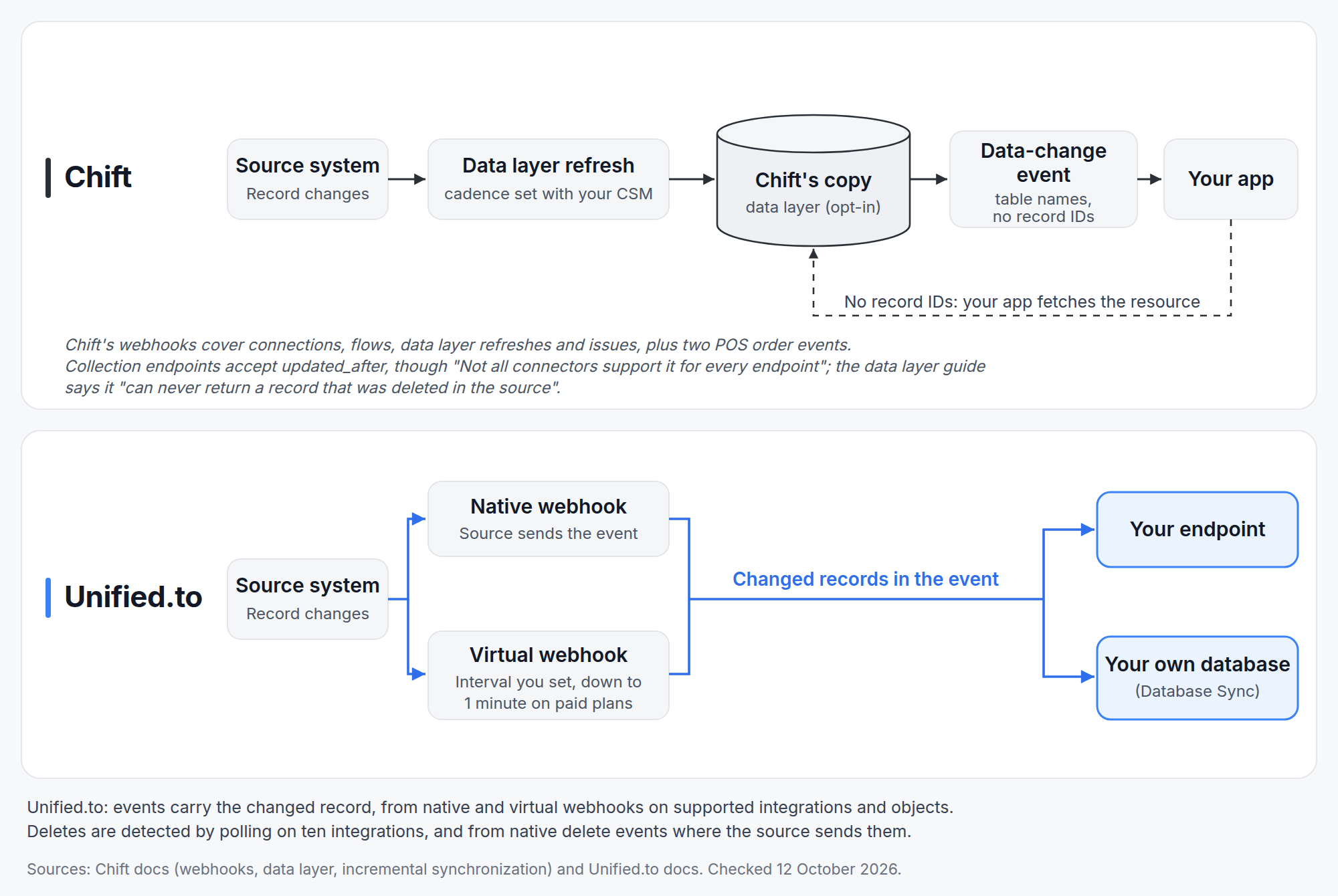
Unified.to sends events that carry the changed record, from native and virtual webhooks on supported integrations and objects; Chift's webhooks report platform events, and detecting record changes is left to your code or to its data layer.
Chift (as of 12 October 2026)
- Events. Webhooks cover connections, flows, data layer refreshes and issues, plus two POS order events (webhooks). The data layer's change event lists table names: "It does not carry record ids. Fetch the resource to retrieve the latest data."
- Change detection. Collection endpoints accept
updated_after, but "Not all connectors support it for every endpoint" (incremental synchronization), and its data layer guide saysupdated_after"can never return a record that was deleted in the source" (fetching data). - Intervals and retries. Data layer refresh cadence is set per connection with your CSM; no minimum, default, webhook retry policy or event billing is published.
Unified.to (as of 12 October 2026)
- Native webhooks are forwarded as the source sends them. Virtual webhooks detect changes and deliver events at an interval you set, down to 1 minute on paid plans (60 minutes on the trial).
- Deletes. Detected by polling on ten integrations, and from native delete events where the source sends them.
- Retries. Virtual webhook deliveries back off progressively for up to about two weeks before the webhook is marked unhealthy.
- Coverage. Support varies by integration and object; check each integration's Feature Support tab.
What happens to your customers' data in Chift and Unified.to?
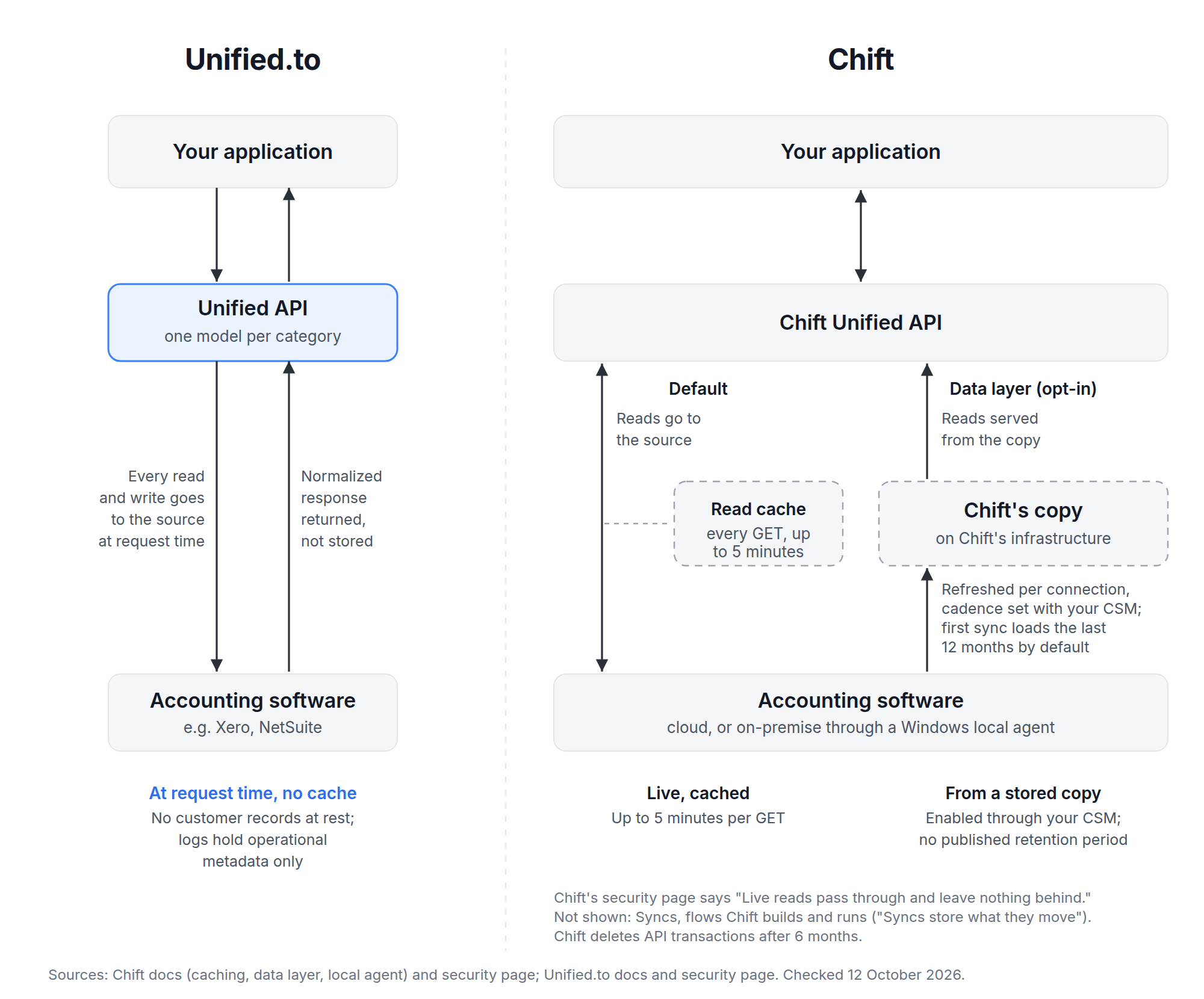
Chift reads from the source by default but caches every read and offers stored copies; Unified.to keeps no customer records at rest. Chift's own pages disagree on this (as of 12 October 2026):
- The claim. Chift's security page says "Live reads pass through and leave nothing behind." (security)
- The cache. Its docs say "Chift temporarily caches all data retrieved through the API." and "Data retrieved via the API is cached for a maximum of 5 minutes." (caching)
- The data layer. When enabled through your CSM, "Chift serves your reads from a copy of the data it maintains on its own infrastructure." It is multi-tenant and has no published retention period (data layer), and its first sync loads the last 12 months by default (activation). Chift's docs say it covers accounting, POS and banking; its data layer page says "Accounting today, across our connector library. Banking and POS are coming."
- Syncs and logs. "Syncs store what they move" (security page), and "Chift deletes transactions after 6 months" (idempotency).
Unified.to (as of 12 October 2026)
- Credentials. Connection credentials are encrypted at rest, or kept in your own secrets manager on Pro and Scale.
- Logs. Endpoint, timing, status and workspace, never payloads; kept 60 days on Grow and Pro and 365 days on Scale.
- Native webhooks. Payloads sit briefly, encrypted, on a processing queue before dispatch.
How do authorization and credentials work in Chift and Unified.to?
Chift and Unified.to both support your own OAuth app; Chift runs the connect step on its own hosted pages, which you can brand, while Unified.to puts the connect step inside your product.
Chift (as of 12 October 2026)
- Connect flow. Each connection gets an activation link whose token expires after 30 minutes. Chift hosts a connector picker (how to connect) and lets you set "the logo, the main color and the button color" of its public pages (configure account), or you build your own picker.
- OAuth apps. Chift's coverage data marks 16 accounting connectors as activated with Chift's own keys, so you can go live without registering an app, though its Pennylane and Pennylane Firm pages, two of the 16, say you need your own. On NetSuite, "You can use Chift's app, or ask Chift for a dedicated one under your own brand." (NetSuite). Others, such as Xero, need your own: "You'll need your own OAuth2 app, registered with Xero." (Xero). The redirect URI is on chift.app, and no custom domain is documented.
- Credentials. Chift stores and refreshes them; no customer-managed secrets store is documented.
Unified.to (as of 12 October 2026)
- Flows. OAuth 2.0 and 2.1, with embedded authorization components for React, Angular, Vue, Svelte and plain JavaScript. An authorization CNAME on Pro and Scale puts the authorization URL on your own domain (US and EU regions).
- OAuth apps. You register your own app with each vendor; Agent Skills walk a coding agent through registering it with vendors' developer portals. More detail: how to handle OAuth across many integrations.
How do Chift's MCP server and Unified MCP compare for AI agents?
Chift and Unified.to both run hosted MCP servers scoped to one end customer: as of 12 October 2026, Chift's remote server uses OAuth with each authorization tied to one consumer, while Unified MCP is generally available over Streamable HTTP with connection-scoped tokens and tools that read and write the normalized model.
Chift (as of 12 October 2026)
- Remote server. Hosted at
mcp.chift.eu/mcp, with OAuth 2.0 and Dynamic Client Registration; each authorization covers a single consumer, and builders set scopes per vertical, including read-only (remote MCP). When a consumer has the data layer, the server reads from it. - Tools. "The MCP server provides 50+ tools", which mirror the Unified API (AI introduction; MCP overview). Chift publishes no MCP spec revision or PII redaction.
- Local server and CLI. An open-source Python package over stdio helps you configure Chift and explore its API across consumers (local MCP), and "The CLI ships with an agent skill that teaches coding agents how to drive it." (CLI). Chifty, its in-dashboard assistant, is in beta.
Unified MCP, scoped to one connection rather than one consumer
- Connection-scoped tokens. A signed token, sent as a Bearer token in the Authorization header, grants one connection and nothing else, so the workspace API key stays on your server. RFC 9728 protected-resource metadata lets MCP clients discover how to authenticate.
- Tool control.
permissions(named scopes, such as read-only CRM) andtools(IDs or patterns) narrow the list,defer_toolsmarks tools for deferred loading, andhide_sensitivestrips names, emails and phone numbers from results; it is opt-in. - Transport. Streamable HTTP only; stdio-only clients use
mcp-remote. It supports the stateless core of the 2026-07-28 MCP revision in production. Each region has its own host (UShttps://mcp-api.unified.to/mcp, EUhttps://mcp-api-eu.unified.to/mcp, AUhttps://api-au.unified.to/mcp), and a credential works only on its own region's host. - Events. As of 26 October 2026, a connection's MCP server also supports the draft MCP Events extension: an agent calls
events/list,events/pollorevents/subscribeto learn when records change, instead of re-reading them. Events are offered on connection servers, not in Core mode; streamed delivery (events/stream) is not supported. - What one agent sees. The 202,568 total is the catalogue across all integrations; an agent sees only its connection's tools. As of 12 October 2026, one HubSpot connection carried 69 tools, 30 of them CRM. Models cap how many tools they handle well: Groq 10, most OpenAI models 20 and Cohere about 50, per Unified.to's docs.
- Outside MCP.
GET /toolsreturns the same tools in OpenAI, Gemini, Cohere, Grok and Groq formats; for Anthropic, requesttype=openaiand renameparameterstoinput_schema. Each tool call and eachevents/pollcounts as one API call on your plan, and each delivered MCP event counts like a webhook delivery (Unified MCP documentation). - Coding agents. A Core MCP server manages workspace configuration and does not read or write end-customer data. As of 26 October 2026, MCP clients that support OAuth can sign in to it at the bare
/mcpURL, with Dynamic Client Registration and PKCE; an OAuth token gives the Core tools only, not a connection's data. As of 12 October 2026, it also serves Unified.to's Agent Skills, through the MCP Skills extension or thelist_unified_skillsandget_unified_skilltools, so connecting it gives a coding agent the build guides for each Unified.to API.
Where can Chift and Unified.to run?
Chift runs as a hosted service in the EU with no self-hosting option published, while each Unified.to workspace runs in one region (the US on every plan, or the EU or AU on Pro and Scale, with Multi-Region Sync on Scale keeping account configuration consistent across regions), and Unified.to Enterprise can run on-prem, in a private or dedicated cloud, or single-tenant.
- Chift (as of 12 October 2026). Its security page says "Your data stays in Europe." and "Hosted in the EU and fully GDPR compliant." (security); the security page names no cloud provider or country, but an August 2026 Chift blog post says "The servers are in Europe, in Paris", its Insights docs say Insights data is stored "on AWS in Paris", and its local-agent prerequisites list AWS eu-west-3 endpoints. For the data layer, "Chift plans to offer a hybrid architecture for this use case in the future." That is a roadmap item.
- Unified.to Enterprise. These options set where Unified.to itself runs, including Unified MCP, which runs as part of the Unified API (Unified.to security; pricing).
How does Chift's pricing compare with Unified.to's?
Chift prices per connection and publishes no prices (as of 12 October 2026), while Unified.to prices per API call from $750 a month with unlimited connections.
| Plan level | Chift (as of 12 October 2026) | Unified.to (as of 12 October 2026) |
|---|---|---|
| Entry | No free tier or trial published | 30-day free trial on Grow and Pro |
| Plans | No pricing page; its terms say "The price of the services is as stated in the contract." Docs use Standard and Enterprise as page-size tiers, and connector cards label each connector Standard or Premium (8 accounting connectors Premium) without defining either | Grow: from $750 a month; 750,000 API calls, then $1.00 per 1,000. Pro: from $1,500 a month; 2,000,000 API calls, then $0.75 per 1,000. Scale: from $3,000 a month; 6,000,000 API calls, then $0.50 per 1,000. Enterprise: usage-based or connections-based, by quote |
| Billed unit | "Pricing is based on connections, not consumers." | API calls, including each MCP tool call and each webhook page delivered; empty checks aren't billed |
| Contract | Indefinite contracts end on three months' notice (2023 terms) | Monthly, or yearly at 17% off |
| Rate limits | No Chift-set rate limits; fair-use throttling reserved | 5,000, 7,500 or 10,000 requests per rolling 60 seconds per workspace on Grow, Pro or Scale |
| Sources: Chift connections; Chift legal; Chift rate limits; Unified.to pricing. Without Chift prices, a cost comparison at a given volume isn't possible. For how per-call and per-connection pricing behave as you grow, see usage-based vs. per-connection pricing. |
How do Chift and Unified.to compare on security and compliance?
As of 12 October 2026, Chift holds ISO 27001; Unified.to holds a SOC 2 Type II report and lists HIPAA, with a BAA on Scale.
Security and compliance (checked 12 October 2026)
| Capability | Chift | Unified.to |
|---|---|---|
| ISO 27001 | ISO 27001 (2022) on its trust centre; certificate on request | Not held |
| SOC 2 Type II | Not published | Report on request through its trust centre |
| GDPR | Stated; EU hosting | Stated |
| CCPA/CPRA and PIPEDA | Not published | Both stated |
| HIPAA and BAA | Not published | HIPAA stated; BAA on Scale |
| Penetration testing | Third-party test; report under NDA | Penetration testing report on request through its trust centre |
| SSO and roles | SSO for platform login; five roles (Admin, Developer, Onboarding, Support, Reporter) | SAML SSO on Pro and Scale; admin and member roles |
| IP controls | Not published | IP restriction on Pro and Scale |
| Logs | API transactions kept 6 months; no log shipping published | Operational metadata only; 60 days (Grow, Pro) or 365 days (Scale); shipping to Datadog, Grafana and ClickHouse on Pro and Scale |
| Uptime SLA | No SLA terms published; a July 2026 Chift blog post mentions "a contractual SLA", and its terms say "All our obligations are obligations of means." | None on Grow, Pro or Scale; SLAs through Enterprise |
| Status page | None linked from its site or docs | Public status page by region |
| Encryption | In transit and at rest | Connection credentials encrypted at rest; operational metadata encrypted at rest with AES-256; TLS 1.2 or later in transit |
| Sources: Chift trust centre; Chift security; Chift roles; Chift legal; Unified.to security. |
Should you choose Chift or Unified.to?
Choose Chift when your product connects to European accounting software, including desktop ledgers on your customers' own servers; choose Unified.to when your product reads and writes the same records across accounting and other categories, or needs published prices.
| If you need... | Choose | Why (as of 12 October 2026) |
|---|---|---|
| Desktop ledgers such as Sage 100 FR, Sage 50, a3ERP, Winbooks Classic or EBP | Chift | Chift's Windows local agent reaches 10 on-premise connector entries |
| Local European ledgers such as DATEV, Pennylane, MyUnisoft or Exact Online by country | Chift | 51 accounting connectors built around European markets |
| To write bank transactions into a ledger | Chift | Writable on 11 accounting connectors; Unified.to reads bank accounts and bank transactions from ledgers such as Xero and NetSuite, and account data from Plaid, Stripe and Brex, but writes no bank feeds (as of 20 October 2026) |
| To go live without registering your own OAuth app | Chift | Chift's own app on 16 accounting connectors per its coverage data (its Pennylane pages say otherwise); Unified.to uses your app |
| ISO 27001 | Chift | Certified to the 2022 version; Unified.to does not hold it |
| No vendor-set rate limits | Chift | Chift sets none; Unified.to limits per workspace by plan |
| A managed service that builds and runs the flows for you, with mappings each customer confirms | Chift | Chift Syncs, where Chift builds the integration and the end customer confirms any mappings during onboarding |
| Every endpoint of one system, because every customer uses the same vendor | A direct integration or a specialist | A cross-vendor model adds little when there is one vendor |
| QuickBooks Desktop | Unified.to | Unified.to writes 10 accounting objects through QuickBooks Web Connector; Chift "connects to QuickBooks Online only, not QuickBooks Desktop" |
| Accounting plus HRIS, ATS, ticketing or other categories through one API | Unified.to | 38 categories; none of these three is among Chift's unified APIs |
| Change events that carry the record, including from systems without native events | Unified.to | Virtual webhooks on supported integrations; Chift's data-change events carry no record IDs |
| Reads with no vendor-side cache or stored copy | Unified.to | Chift caches reads and offers a stored data layer |
| Records kept current in your own database | Unified.to | Database Sync on Grow, Pro and Scale, for objects with native or virtual webhooks; Chift's data layer is its own store |
| Published prices and a trial | Unified.to | 30-day free trial on Grow and Pro; Chift publishes no prices or trial |
| SDKs beyond Python and Node.js, or embedded authorization components | Unified.to | Seven SDKs and components for five frontend options; Chift publishes two SDKs and no components |
| SOC 2 Type II, PIPEDA or a HIPAA BAA | Unified.to | Report on request, PIPEDA stated, BAA on Scale; Chift publishes none of these |
| Hosting in the US, or a choice of US, EU or AU | Unified.to | US on every plan; EU or AU on Pro and Scale; Chift says it hosts in the EU |
| The answer can differ by feature inside one product: a sync into a customer's Sage 100 FR or Winbooks Classic server may point to Chift, while a feature that reads the same records across customers' CRM, HR and accounting systems points to Unified.to, and a product can use both. Anton Zaides, Engineering Manager at HoneyBook, a Unified.to customer, describes working with Unified.to: "The responsiveness from Unified and the willingness to adapt to what we needed stood out. It's the best turnaround I've seen on requests and questions." For more accounting options, see Best unified API for accounting integrations in 2026. |
Frequently asked questions
What if I want AI access to my own company's SaaS tools rather than to build a product?
Use UnifiedMCP, which Unified.to operates for individuals and internal teams who want to connect ChatGPT, Claude, Gemini or Cursor to their own accounts, such as Salesforce, HubSpot, Slack, Stripe and Notion, without writing code.
What happens to my customers' connections if I leave?
On Unified.to, the API returns each connection's tokens, and tokens issued to your own OAuth app keep refreshing after you leave, so your customers don't reconnect. As of 12 October 2026, Chift documents no token export, and its 2023 general terms say "If the contract is not continued, Chift will immediately and permanently delete the Customer's account." Moving from another unified API or integration platform? Unified.to's migration guides map authorization, API calls, pagination, webhooks and passthrough, and cover re-authorizing customers or importing credentials from your own OAuth apps.
Start your 30-day free trial of Unified.to or book a demo to see how the coverage and architecture fit your product.
Written by Mallory Greene.
About the author: Mallory Greene is Head of Marketing at Unified.to_. She writes about integration infrastructure, unified APIs, and MCP for technical teams. Based in Toronto._